Nebi components
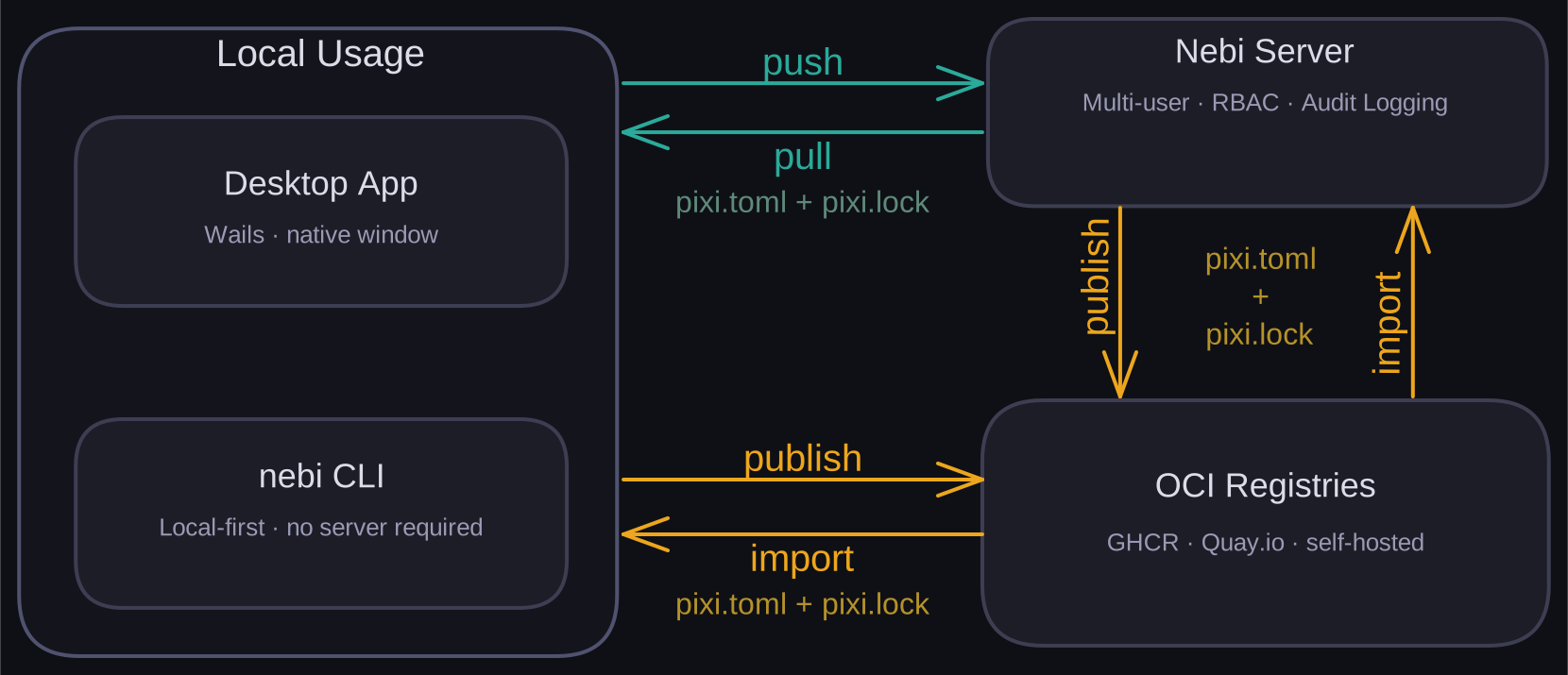
It has three components: a CLI, a desktop app, and a team server. All share the same core libraries but serve different use cases.
System overview
CLI
The CLI is a standalone tool for managing and tracking Pixi workspaces on your local machines, both for solo use and for team workflows backed by a Nebi server. Every command is documented in the CLI reference.
- Local database: Track workspace names, paths, and versions in a local database
- Pixi shell/run: Open a pixi shell or run pixi tasks by workspace name
- Publish/import - OCI registries: Push workspace bundles (specs plus optional asset layers) directly to OCI registries, and import them on another machine
- Push/pull - Nebi server: Sync (push) versioned
pixi.tomlandpixi.lockspecs to a Nebi server, and pull from a different machine - Track state (diff): Compare specs between local directories, workspace names, or server versions
Desktop application
The desktop app is another tool for managing Pixi workspaces on your local machines. It supports all the CLI workflows through a graphical / app interface.
OCI Registries
Nebi can publish workspace bundles to any OCI-compliant registry such as GitHub Container Registry, Quay.io, or self-hosted registries. A bundle always contains pixi.toml and pixi.lock, and may also include other project files (READMEs, source code, data).
- Publishing can be done from the CLI (
nebi publish) or triggered from the desktop app or server - The desktop app and server UI include a registry browser for discovering and pulling published bundles
Bundles are packed into an OCI Image Manifest with custom media types for the spec and for each asset layer. Each push creates a content-addressed tag (sha-<hash>) plus a latest tag and any user-specified tags.
Nebi Server
The Nebi server is the team deployment of Nebi. It runs the desktop app interface but in a server and team mode with full multi-user support.
- Authentication: JWT-based sessions with pluggable backends — basic auth, OIDC, or proxy auth
- Role-based AC: Apache Casbin-based access control with per-workspace permissions (read, write, admin) for users
- API: Git-based HTTP server serving the REST API and the bundled React frontend
- Central database: SQLite (default) or PostgreSQL for workspace and user tracking
- Background worker: Background processor for async operations like workspace creation and package installation
- Job queue: In-memory queue (single instance) or Valkey (distributed deployments) to process workspace creation and updating requests.
Learn more: Nebi server setup.