Nebi Server
The Nebi server is a hosted web interface to manage Nebi workspaces in a team. It has a similar interface as the local desktop, but with more features for teams and organizations.
This page covers how to run and configure it.
Admin Credentials
Before starting the server for the first time, set ADMIN_USERNAME and ADMIN_PASSWORD. Nebi uses these to create the initial admin account for authentication.
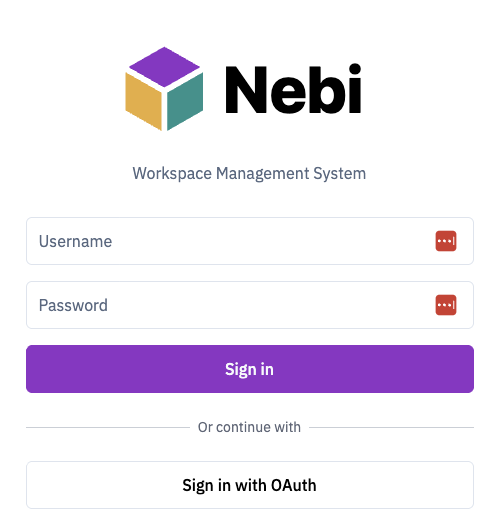
You (and your team) will use these credentials to log in via nebi login or the web UI.
Export the variables in your terminal session before starting the server:
export ADMIN_USERNAME=admin
export ADMIN_PASSWORD=your-password
Running the Server
Start the server:
nebi serve
By default (--host unset), Nebi binds all interfaces on port 8460 in team mode. Local mode (NEBI_MODE=local) is a single-user, on-device setup, so the server binds only the loopback interface (127.0.0.1) and only accepts requests addressed to a local host/origin. To bind a local-mode server to another interface, set --host (or NEBI_SERVER_HOST) explicitly.
To use a different port:
nebi serve --port 9000
To explicitly bind a host/interface, use --host (or NEBI_SERVER_HOST):
nebi serve --host 127.0.0.1 --port 8460
Once the server is running, authenticate from any client machine with nebi login.
API Documentation
The Swagger API docs are available at http://localhost:8460/docs.
Groups
OIDC group sync
When OIDC authentication is configured, nebi requests the groups scope alongside openid profile email. The IdP must return a groups claim in the ID token (a JSON array of strings). On every login, nebi reconciles the user's group memberships:
- For each name in the claim, an OIDC-source group is created (if missing) and the user is added to it.
- Memberships in OIDC-source groups that aren't in this login's claim are removed.
- Native groups (created via the admin UI) are never modified by OIDC sync — even if a claim name happens to collide with a native group name.
OIDC groups with zero members are kept so existing workspace shares survive temporary churn. There is no background reconcile worker; all updates happen at login time.
Build Sandbox
Environment builds run untrusted code. A pixi.toml is supplied by whoever pushes the workspace, and resolving or installing it lets the solver, the package build scripts, and every post-link script in the environment execute on the server, as a child of the nebi process. The build sandbox limits what that code can see and do.
There are two layers. Both apply to builds the server and its worker run on behalf of users. The CLI running pixi on your own machine is unaffected, since it already runs as you.
Environment scrubbing (always on)
Every pixi build subprocess the server or worker starts gets a fresh environment built from an allowlist: PATH, LANG, LC_ALL, SSL_CERT_FILE, SSL_CERT_DIR, and the proxy variables (HTTP_PROXY, HTTPS_PROXY, NO_PROXY and their lowercase spellings), plus HOME and TMPDIR. Everything else in the server's environment is dropped, so NEBI_DATABASE_DSN, NEBI_AUTH_JWT_SECRET, NEBI_QUEUE_VALKEY_ADDR, and any registry credentials never reach build code.
This layer applies in every mode, on every platform, and cannot be turned off.
Landlock confinement (Linux)
When sandbox.mode is not off, each pixi command is re-executed through an internal shim that applies a Landlock ruleset to itself and then execves pixi. The confinement is inherited across execve, so pixi and everything it spawns stay confined.
A confined build may:
- Read and write its own workspace directory, and nothing else on disk.
- Read
/usr,/lib,/lib64,/bin,/sbin,/opt, the TLS trust stores (/etc/ssl,/etc/pki,/etc/ca-certificates), and the directory holding the pixi binary. Paths that do not exist on the host are skipped. - Read
/etc/resolv.conf,/etc/hosts,/etc/nsswitch.conf,/etc/localtime,/etc/passwd, and/etc/group. - Read and write
/dev/null,/dev/urandom,/dev/random, and/dev/zero. - Open TCP connections to the ports in
sandbox.allowed_ports. Listening is always denied.
/etc is deliberately not readable as a whole. nebi looks for its own config.yaml in /etc/nebi/, and both database.dsn and auth.jwt_secret can live there, so a readable /etc would hand build code the very credentials the environment allowlist strips. Only the trust stores and the individual files listed above are granted.
Landlock is unprivileged self-sandboxing. It needs no CAP_SYS_ADMIN, no user namespaces, and no uid switching, so it works under runAsNonRoot with all capabilities dropped.
Configuration
sandbox:
  mode: strict          # strict | permissive | off
  allowed_ports: [80, 443]
  build_timeout: 30m
| Key | Environment variable | Default |
|---|---|---|
sandbox.mode | NEBI_SANDBOX_MODE | strict in team mode, off in local mode |
sandbox.allowed_ports | NEBI_SANDBOX_ALLOWED_PORTS | [80, 443] |
sandbox.build_timeout | NEBI_SANDBOX_BUILD_TIMEOUT | 30m (minimum 1s) |
NEBI_SANDBOX_ALLOWED_PORTS takes a comma-separated list, for example NEBI_SANDBOX_ALLOWED_PORTS=80,443,8443.
Modes
| Mode | Confinement available | Confinement unavailable |
|---|---|---|
strict | build runs confined | the job fails with build sandbox setup failed and a hint naming NEBI_SANDBOX_MODE |
permissive | build runs confined | a WARNING: build is running UNCONFINED line is written to the build log and the build runs unconfined |
off | no confinement is attempted (environment scrubbing still applies) | same |
"Unavailable" covers a kernel without Landlock, a non-Linux host, and any other failure to establish the ruleset. Sandbox setup failures are reported separately from build failures so an infrastructure problem is not mistaken for a broken pixi.toml.
Kernel requirements
Confinement degrades one capability at a time as the kernel gets older:
| Landlock ABI | Kernel | Filesystem confinement | Renames across directories inside the workspace | TCP restriction |
|---|---|---|---|---|
| v4 | 6.7+ | yes | yes | yes |
| v2, v3 | 5.19+ | yes | yes | not enforced, warning |
| v1 | 5.13+ | yes | no, they fail with EXDEV | not enforced, warning |
| none | below 5.13 | no, the mode decides what happens |
Two consequences worth planning around:
- A missing TCP restriction is a warning, never a build failure, even in
strictmode. The filesystem is still confined, so the build is not run wide open, but on kernels below 6.7allowed_portshas no effect and build code can reach anything the pod can reach. - ABI v1 is the hard floor for the filesystem, but it is not a comfortable one. Package managers rename a staged download into their cache constantly, and on v1 that fails with
EXDEV. Treat Linux 5.19 as the practical minimum and 6.7 as the version where the whole feature works.
:::note An empty port list means offline, not unrestricted
allowed_ports: [] denies all TCP, which is how you get fully offline builds. It does not mean "no restrictions".
You cannot express that through the environment. An empty environment variable reads as unset, so NEBI_SANDBOX_ALLOWED_PORTS="" silently leaves the default [80, 443] in place. Use the YAML form for an empty list.
:::
Upgrading an existing deployment
Turning the sandbox on is a behavior change, and strict is the team-mode default, so an upgrade starts enforcing it without any config change on your part. Two things that previously did not exist begin to apply:
- Confinement. Builds on hosts whose kernel is older than 5.13, and on any non-Linux host, will start failing until you set
NEBI_SANDBOX_MODE=permissive(warn and run unconfined) orNEBI_SANDBOX_MODE=off. - The wall-clock build timeout. Any job that runs longer than
sandbox.build_timeoutis killed and fails with abuild exceeded the ... time limiterror naming the configured value. RaiseNEBI_SANDBOX_BUILD_TIMEOUTif you have legitimately long builds. It must be at least1s, so the ceiling can only be raised, not removed. The timeout applies in every mode, includingoff.
Check uname -r on your build hosts before upgrading. If you want the isolation but cannot guarantee the kernel yet, permissive gives you the confinement where it is available and a warning in the build log where it is not.
Per-workspace package cache
While the sandbox is active, HOME and TMPDIR point at .nebi-home and .nebi-tmp inside the job's own workspace directory. The pixi and rattler package caches therefore land inside the workspace instead of a location shared by every tenant.
The trade-off is deliberate. One tenant cannot poison another tenant's cached packages, but there is no cache reuse across workspaces, so the first build in each workspace re-downloads what it needs. Size your workspace storage accordingly.
In off mode nothing is redirected: the parent's HOME and TMPDIR pass through and the usual shared cache is used.
Known limitations
- Private channel credentials do not reach confined builds. pixi and rattler read
$HOME/.rattler/credentials.json, andHOMEis redirected into the workspace whenever the sandbox is active, so a build cannot pick up credentials placed in the service account's home directory. Private conda channels needoffmode today. - The timeout signals only the direct child. Processes that pixi itself spawned can outlive a timed-out job. They stay confined by the same Landlock ruleset, so this is a resource-cleanup gap rather than a containment gap.
What's Next
- See the CLI Team Workflows for push/pull examples
- Check the CLI Reference for all available commands